Overview:
This article explains how to connect and manage your school’s integrations with Edrolo. Integrations allow schools to keep your classes and enrolments up to date through automation.
At launch, you'll be able to view connected timetable integrations and configure Compass integrations. Additional options and integrations will be developed over time.
What you can do here:
- See which integrations are currently available to your school
- Connect supported integrations (Compass only at launch, others can be requested)
- View the status of any configured or active integration
- Find links to configuration setup guides
Compass:
- Follow the step‑by‑step guide to connect Compass to Edrolo-->Set up Compass Integration in Admin Hub
LISS and Wonde:
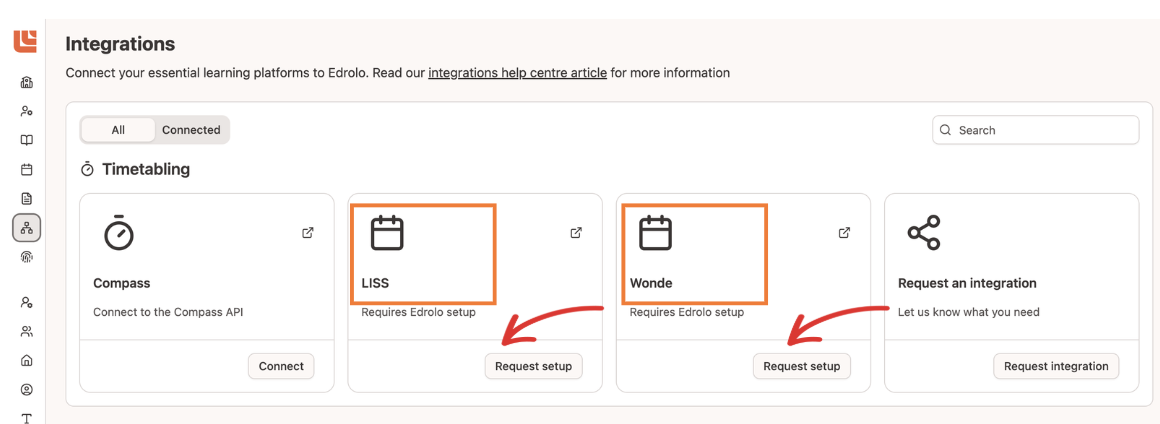
- Request setup or changes, select LISS or Wonde will open a mailto link to contact Edrolo Support to request setup or changes
- What to Include in your email to Edrolo:
- Your requested integration type (LISS or Wonde): Let us know which integration you’s like to set up or change to
- Your school’s name
- Your school’s best contact person (name+email)
Integration status:
-
For each integration tile, you'll be able to see its current status indicator.
- Status indicators help you understand whether an integration is working properly
- Different statuses show whether the integration is set up correctly or needs attention:
✅ Active-working correctly and up to date;
⚠️Not active-may require setup or fix
Need help?
If you have questions or need assistance, contact Edrolo’s Customer Care Team at help@edrolo.com. We’re happy to help you choose the right integration path and get connected quickly.