Note: This article is about a new Edrolo feature coming soon 🎁
Overview:
Integrations connect Edrolo to the systems your school already uses — like your timetabling platform or student information system — so your classes and enrolments stay up to date automatically. Instead of manually re-entering data when a student changes class or a new student enrols, an integration keeps Edrolo in sync for you.
This article covers how to view, connect, and manage your school's integrations from Admin Hub.
At launch, you can:
- View any timetable integration your school already has connected
- Connect Compass yourself, directly from Admin Hub
- Request other integrations (LISS or Wonde) through Edrolo Support
More integrations and self-serve options will be added over time.
What you can do here:
- See what's available: check which integrations your school can use
- Connect Compass: set it up yourself, no support request needed
- Request LISS or Wonde: send a quick request to Edrolo Support
- Check integration status: see whether a connected integration is working correctly
- Find setup guides: jump straight to step-by-step instructions
Compass:
Compass is the only integration you can set up yourself at launch — no need to contact support.
Follow the step‑by‑step guide to connect Compass to Edrolo-->Set up Compass Integration in Admin Hub
LISS and Wonde:
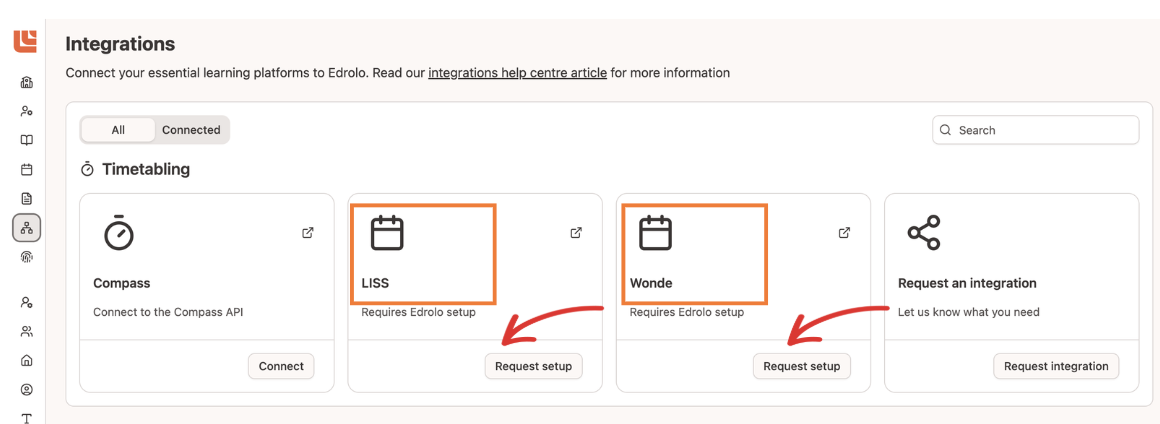
LISS and Wonde aren't self-serve yet. Selecting LISS or Wonde on the integrations page opens a pre-filled email so you can request setup or changes directly with Edrolo Support.
To help us action your request quickly, make sure your email includes:
- Integration type: Let us know whether you'd like to set up or change LISS or Wonde
- School name: Your school's name
- Contact person: Your school's best contact for this request (name and email)
Integration status:
-
For each integration tile, you'll be able to see its current status indicator.
- Status indicators help you understand whether an integration is working properly
- Different statuses show whether the integration is set up correctly or needs attention:
✅ Active-working correctly and up to date;
⚠️Not active-may require setup or fix
Need help?
If you have questions or need assistance, contact Edrolo’s Customer Care Team at help@edrolo.com. We’re happy to help you choose the right integration path and get connected quickly.